See it in action
From zero to merged in minutes
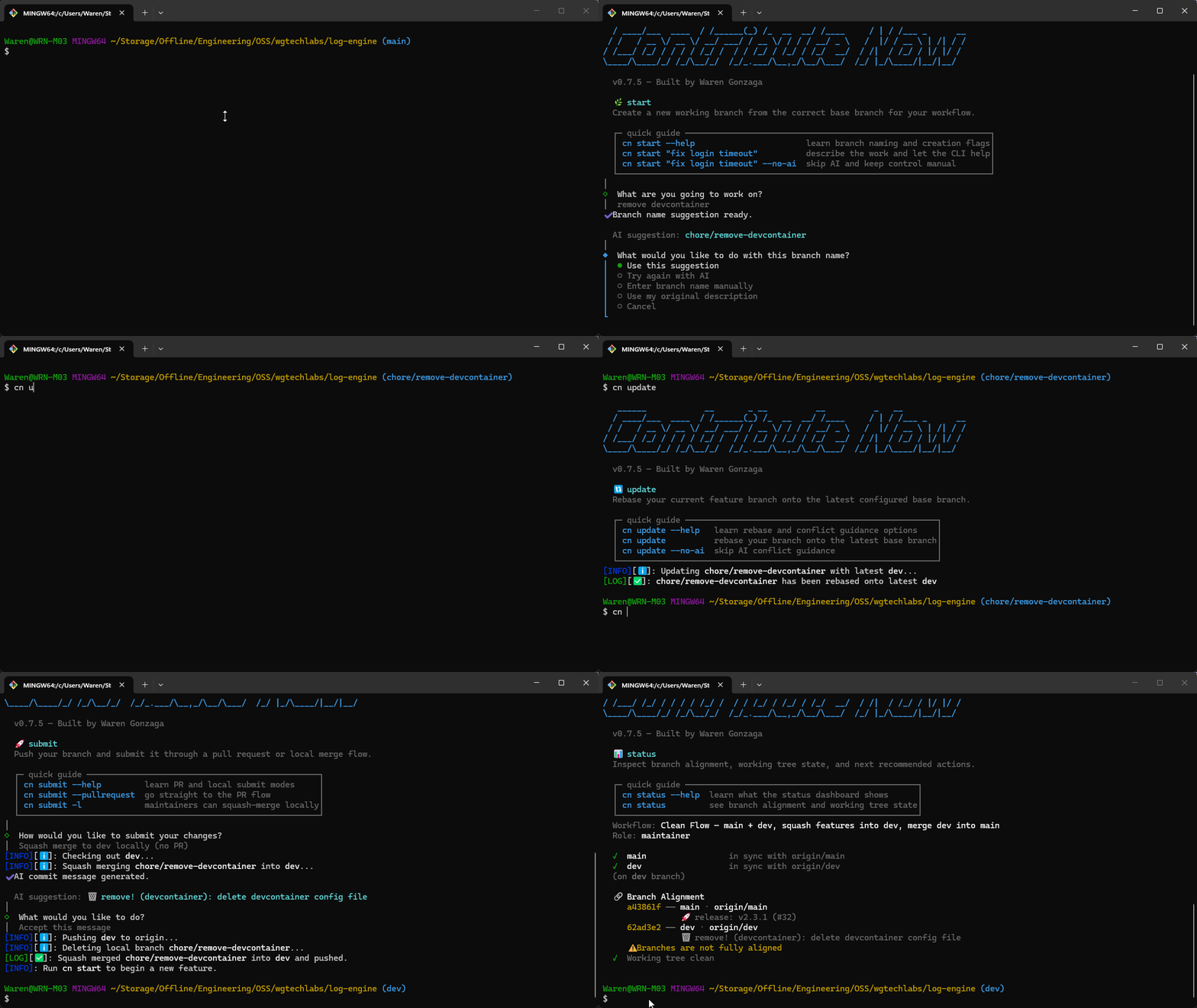
Great open source PRs die not from bad code but broken process, contribute-now guides you through the right branch, clean commits, and proper sync locally before anything reaches the remote, powered by GitHub Copilot .
Works as cn, contribute, or cn — yes, cn is shorter than git. Your workflow just got faster to type. ⚡
Used by
Using contribute-now in your project?
Let us know →
Built on Clean Flow by WG Tech Labs — keep a completely linear history on main while maintaining a stable dev branch for integration. No more messy merges or broken histories.
Powered by the Clean Commit spec by WG Tech Labs — stop writing "wip" or "fix". The CLI guides your AI to generate semantic, structured commit messages automatically based on your changes.
--group) splits changes into atomic commits
Zero context switching. Let Copilot handle the tedious parts of git directly in your terminal, without ever leaving your workflow.
--model
15 commands covering the entire contribution lifecycle, from initial setup to merged PR.
The six-step contribution cycle
setup
Interactive wizard that configures workflow mode, commit convention, role, branches, and remotes.
sync
Pull latest changes from the correct remote branch based on your workflow and role.
start
AI
Create a feature branch from the correct base, with AI-powered branch naming from natural language.
commit
AI
Stage changes and create validated commit messages. Group mode splits changes into atomic commits.
update
AI
Rebase onto the latest base branch, with AI guidance when conflicts occur.
submit
AI
Push your branch and open a PR with an AI-generated title and description.
Visibility and maintenance tools
clean
Delete merged branches and prune stale remote refs.
status
Show a sync status dashboard for main, dev, and current branch.
switch
Switch branches interactively with automatic save protection for uncommitted changes.
save
Save, restore, list, and drop uncommitted changes without memorizing git stash.
branch
List branches with workflow-aware labels and tracking status.
log
Shows local unpushed commits by default. Switch to remote, full history, or all branches with flags.
Enforce conventions and troubleshoot
hook
Install or uninstall a commit-msg git hook. No Husky needed.
validate
Lint a commit message against your convention. CI-friendly exit codes.
doctor
Diagnose CLI environment: checks tools, config, git state, forks, and workflow setup.
See the full documentation for detailed usage of every command and flag.
# no install needed
bunx contribute-now setup

# or install globally
bun install -g contribute-now
cn setup # shorter than git! also: cn, contributecn sync
# ✓ updates your base branch (main/dev)
# ✓ syncs with upstream automaticallycn start "fix login timeout" # AI names the branch
cn commit # AI writes the message
cn commit --group # or split into atomic commits
cn update # rebase onto base
cn submit # push + open PR
cn clean # clean merged branchesCore git commands under the hood. Any recent version works.
💡 WSL2 tip: If your SSH key has a passphrase, run eval "$(ssh-agent -s)" && ssh-add so Git reuses the unlocked key.
Required for PR creation, role detection, and merge status checks. Without it, submit can only push and print a manual URL.
Unlocks all AI features. Any active Copilot subscription works.
github.com/features/copilot →Contributors spend hours writing PRs, only to have them closed with little explanation. Projects get flooded, so maintainers resort to auto-closing PRs and bot-driven triage instead of building. But the chaos isn't the root cause: it's that contributors don't have clear guidance on how to contribute properly in the first place. Wrong branch, merge conflicts, broken conventions. When that piles up across hundreds of contributors, it becomes unmanageable for everyone.
Instead of patching problems after they reach the remote repo, contribute-now gates the process locally. It ensures contributors are synced, on the right branch, following the right conventions, and submitting clean work, all before they push. Building the foundation of proper contribution rather than patching the cracks after the fact. Your sponsorship keeps this tool free, maintained, and evolving for everyone.
Whether it's a recurring sponsorship or a one-time coffee, your support directly funds full-time open source development: shipping features, improving AI accuracy, and ensuring no contributor's work gets thrown away because of process issues.
Become a sponsor and get exclusive perks. Your support directly funds open source development.
Become a Sponsor →Just love what I do? A one-time coffee is a simple way to say thanks and keep me coding!
Buy Me a Coffee →Built with ❤️ by Waren Gonzaga & YHWH 🙏, shipping open source since 2017.
Try it in any repo. No global install required.